Looks like you were able to acquire AWE-Q, great! Is your board flashed with the ARM and DSP AWECore images?
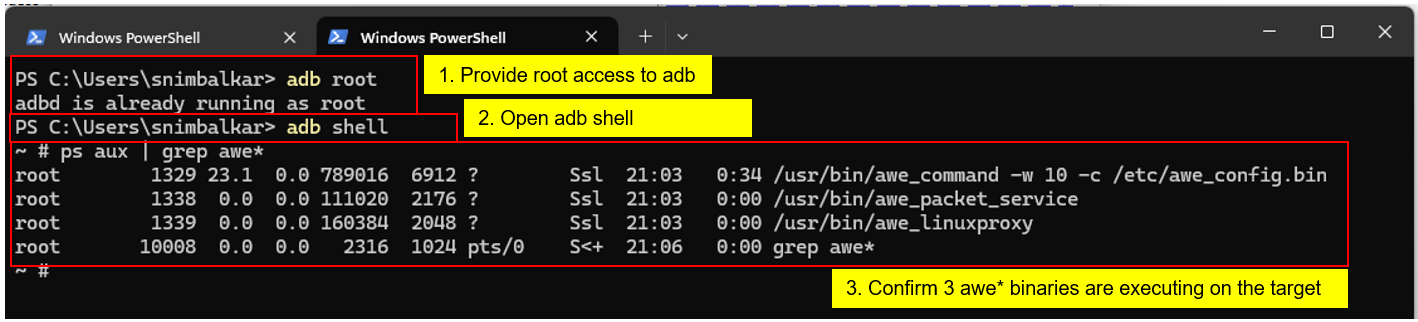
You can check by doing:
`adb root`
`adb shell`
`ps aux | grep awe*`
This should return 3 awe* process like shown below
Once you see these processes, you connect to the board via TCP/IP connection with IP address 192.168.1.1 in AWE Server.
You may also have to set the TCP/IPv4 ethernet port properties on your PC to use address 192.168.1.10 with subnet 255.255.255.0.
Looks like you were able to acquire AWE-Q, great! Is your board flashed with the ARM and DSP AWECore images?
You can check by doing:
`adb root`
`adb shell`
`ps aux | grep awe*`
This should return 3 awe* process like shown below
Once you see these processes, you connect to the board via TCP/IP connection with IP address 192.168.1.1 in AWE Server.
You may also have to set the TCP/IPv4 ethernet port properties on your PC to use address 192.168.1.10 with subnet 255.255.255.0.
We have connected to the 8797 target with the way of TCP/IP , but failed when click "Refresh Target Info" in AWE designer, please help me to solve it, thanks. and sometimes we can connect to the 8797 target, sometimes we could not connect. is there something wrong with the tool?

1:52pm
Hi Jesper,
Looks like you were able to acquire AWE-Q, great! Is your board flashed with the ARM and DSP AWECore images?

You can check by doing:
`adb root`
`adb shell`
`ps aux | grep awe*`
This should return 3 awe* process like shown below
Once you see these processes, you connect to the board via TCP/IP connection with IP address 192.168.1.1 in AWE Server.
You may also have to set the TCP/IPv4 ethernet port properties on your PC to use address 192.168.1.10 with subnet 255.255.255.0.
1:52pm
Hi Jesper,
Looks like you were able to acquire AWE-Q, great! Is your board flashed with the ARM and DSP AWECore images?


You can check by doing:
`adb root`
`adb shell`
`ps aux | grep awe*`
This should return 3 awe* process like shown below
Once you see these processes, you connect to the board via TCP/IP connection with IP address 192.168.1.1 in AWE Server.
You may also have to set the TCP/IPv4 ethernet port properties on your PC to use address 192.168.1.10 with subnet 255.255.255.0.
2:19am
hi ajbdspc,
Thanks for your reply, i will check.
7:32am
hi ajbdspc,
I can‘t connect awe server to 8797 board, is it mandatory for the PC to use 192.168.1.10 as its IP address?
3:51am
hi ajbdspc,
We have connected to the 8797 target with the way of TCP/IP , but failed when click "Refresh Target Info" in AWE designer, please help me to solve it, thanks. and sometimes we can connect to the 8797 target, sometimes we could not connect. is there something wrong with the tool?